

















Launchpad.net Feature Tour
Mini-site to introduce the general public to launchpad.net, a new FOSS (Free Open Source Software) platform from Canonical.
2007
Canonical's Launchpad.net — an open-source project management, bug tracking, and repository service — needed a way to explain itself to developers who had never used it. The platform had five distinct tools, but no clear entry point for new users to understand what they did or why they mattered.
I designed a feature tour mini-site that introduced each tool through a simple, navigable experience — turning a complex developer platform into something a first-time visitor could understand in minutes.
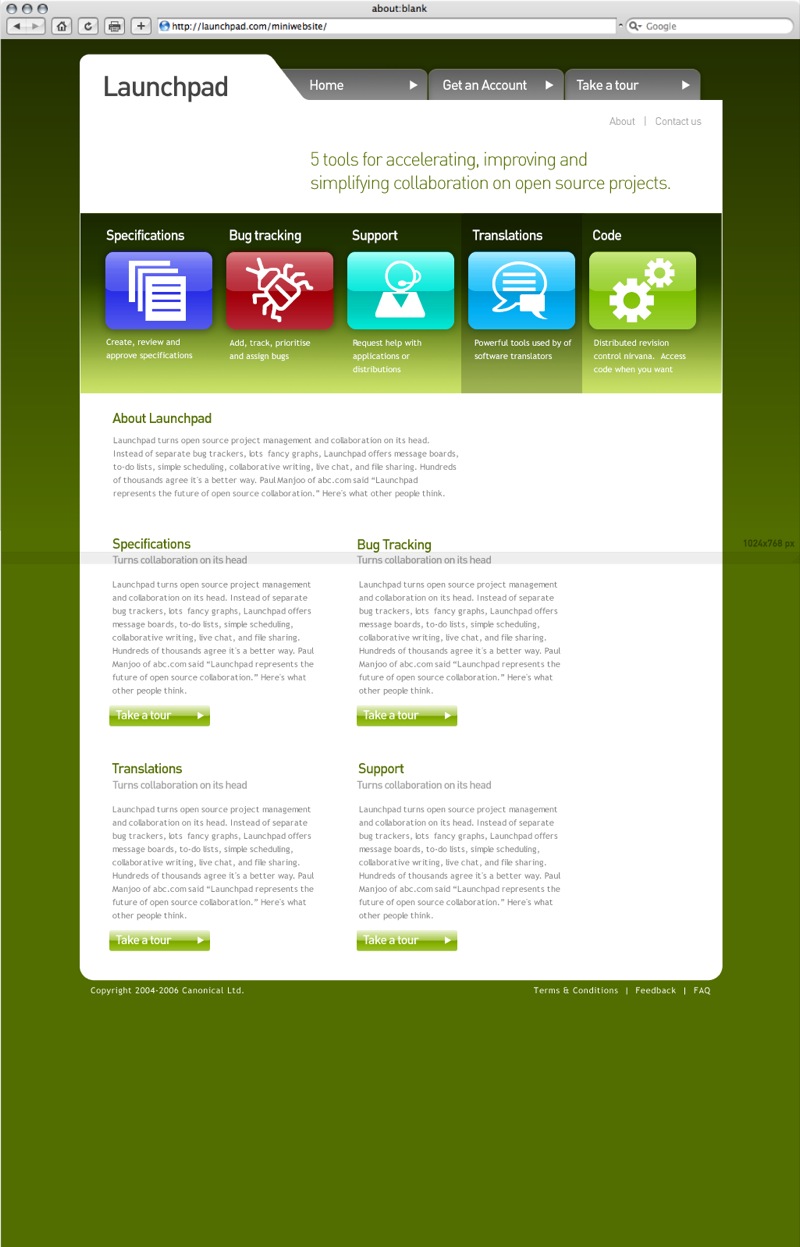
Five tools explained through a single guided tour
Launchpad offered specifications, bug tracking, support, translations, and code hosting — but presenting them as a feature list would have read like documentation. The tour gave each tool its own section with a consistent format: icon, summary, and a deeper explanation accessible in one click.
The homepage laid out all five tools as equal entry points, so visitors could start with whatever matched their interest rather than following a prescribed order.


Navigation adapted as the site evolved
The button bar and navigation went through iterations to balance clarity with scannability. The original tabbed navigation worked for feature sections, but as the tour expanded, a revised nav bar gave visitors a clearer sense of where they were in the tour and what they hadn't seen yet.
Each variation was tested against the same goal: a new visitor should be able to understand all five tools without reading documentation.


Results
A feature tour mini-site for Canonical's Launchpad.net that introduced five developer tools — specifications, bug tracking, support, translations, and code hosting — through a guided, visually consistent experience designed for first-time visitors.
5 tools · single guided tour · built for Canonical